
by John Reynolds
Introduction
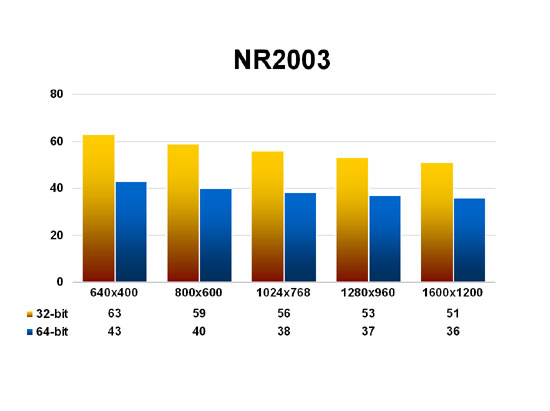
Released on April 30th, Windows XP Professional x64 Edition is an updated version of Microsoft’s workstation operating system designed to support 64-bit processors and applications. This new edition of XP works with both AMD64 and Intel’s EM64T, x64 processors that are compatible with standard, 32-bit x86 CPUs and binary compatible, as architectures, with each other, allowing Microsoft to release a single version of its x64 OS. In this article, SimHQ will compare the relative performance of the games in our benchmark suite on both versions of Windows XP. But first, let’s take a quick look at the reasons why Microsoft suggests upgrading to the x64 edition.
Windows XP Pro x64 supports 64-bit native applications, suggesting that the OS would allow a system to execute more data per clock cycle, thereby increasing overall desktop performance. While at a software level this may be true, the potential road block in the way of Microsoft’s widened 64-bit road may be all those 32-bit serial buses so common on today’s desktop motherboards. Even PCI Express, the newest bus for the x86 platform, is a 32-bit connection and would therefore need two clock cycles to move native datum written in 64 bits. So SimHQ is a little skeptical that current hardware designs are optimal platforms for 64-bit code. Existing x86 systems are also limited by Windows XP to 4 GB support for both physical and virtual memory, and Microsoft claims that x64 edition’s increased support to 128 GB of RAM and 16 TB (terabytes) of virtual memory will improve application performance. While this may be true for certain professional workstation applications, it’s hardly relevant for the vast majority of desktop usage for the foreseeable future. Last, Microsoft also claims that moving to the new version of the OS will allow greater flexibility by enabling users to run both 32- and 64-bit applications thanks to WOW64 (Windows On Windows 64), a x86 software emulation layer that provides compatibility with 32-bit software. The emulator works by loading a small group of dynamic link library files at startup that initialize all 32-bit DLLs needed by the system; these 32-bit DLL files are almost exact copies found in the regular version of Windows XP, though some have been changed to enable memory sharing with 64-bit system components, and allow the interception and conversion of 32-bit calls to native system calls in a x64 environment. So installing XP Pro x64 doesn’t mean you have to throw away all your old games and applications, at least according to the Redmond giant. We’ll see how this additional software layer affects system performance and if compatibility is as robust as Microsoft claims for their new OS.
Windows XP Professional cannot be upgraded to the x64 edition, so a clean install of the new OS is required. Also needed is a x64 processor and 64-bit drivers for various system components. Last, 64-bit applications are likewise required to complete the picture, but these are likely to take the longest to arrive.
Test System Setup
- AMD Athlon 64 FX-55 (2.6GHz)
- ASUS A8N SLI Deluxe (nForce4) motherboard
- 1 GB (2x 512 MB) Corsair DDR400 memory
- ATI Radeon X800 XT PCI Express graphics board (Catalyst v5.4)
- Windows XP Professional (SP2) and Windows XP Pro x64 Edition
- DirectX 9.0c
The benchmark suite used to evaluate this test system is listed here. As standard practice, 32-bit color and trilinear texture filtering are the default baseline during testing, and anti-aliasing and anisotropic texture filtering were disabled throughout all tests. The 64-bit version of the Catalyst 5.4s were used for the Radeon X800 XT and the nForce4 6.39 betas installed for the ASUS A8N motherboard when running the x64 edition of the OS. Also, both versions of Windows XP Professional were configured to have Automatic Updates, System Restore, and all unnecessary startup services disabled. The licensed version of Fraps 2.5.5 was used to record performance scores unless otherwise noted.
Related Posts:

Related posts:
 OS Shootout 2007: Windows XP Professional vs. Windows Vista Ultimate
 Page 2
OS Shootout 2007: Windows XP Professional vs. Windows Vista Ultimate Page 7
OS Shootout 2007: Windows XP Professional vs. Windows Vista Ultimate
OS Shootout 2007: Windows XP Professional vs. Windows Vista Ultimate Page 2
OS Shootout 2007: Windows XP Professional vs. Windows Vista Ultimate Page 7
 Windows XP Pro x64 Edition Performance Analysis
 Windows XP Pro x64 Edition Performance Analysis Page 2
Windows XP Pro x64 Edition Performance Analysis Page 3
Windows XP Pro x64 Edition Performance Analysis Page 4
Windows XP Pro x64 Edition Performance Analysis Page 5
Windows XP Pro x64 Edition Performance Analysis Page 2
Windows XP Pro x64 Edition Performance Analysis Page 3
Windows XP Pro x64 Edition Performance Analysis Page 4
Windows XP Pro x64 Edition Performance Analysis Page 5


