
by Chris “BeachAV8R” Frishmuth

Now on to the Level-D Boeing 767! The LD767 has been widely anticipated in the FS2004 community for some time now. A descendant of the Pilot in Command series, the Level-D team has a solid reputation for producing quality add-ons for Flight Simulator.

The first Boeing 767 rolled off the assembly line in Everett, Washington in late 1981. The 767 started the trend of removing the Second Officer (or Flight Engineer) from the flight deck and pilots lucky enough to be certified to fly the 767 can fly the 757 as well since the 767/757 type ratings are unified. According to the Level-D team, we can look for a future B-757 release as well! The 767 is another widebody airframe that has seen service in both a long-haul passenger configuration as well as dedicated cargo configuration. The 767 has been and will be seen in other emerging roles such as a replacement for the U.S. Air Force’s aging KC-135 air-refueling tanker and Japan has taken delivery of four 767 AWACS aircraft.
As was the case with the SSW A310, I have to stress that the LD767 isn’t exactly a Piper Warrior, so don’t expect to hop right in and blast off on a successful flight without first having read the extensive documentation. The LD767 comes with an excellent 175 page manual that logically arranges all of the aircraft systems into chapters instead of the multiple PDF approach that SSW chose. It also seems clear that the manual was written specifically for the LD767 and provides an excellent mix of real B767 operation with how the product actually works within the sim.


There is also an extremely well written tutorial that takes the new 767 pilot through a step-by-step flight hitting all of the pertinent details needed to accomplish the task successfully. Following closely through the tutorial steps can help not only with the tutorial flight, but any flights you wish to undertake since the process is essentially the same for all flights with the obvious exception of programming the FMC specifically for your route.

One small technical note here; I’m reluctant to print out most PDF manuals since the cost of ink is so incredibly high. Unfortunately that limits me to having to Alt-TAB out of the sim to read the PDF, then Alt-TAB back in to put the knowledge to use. My computer handles this task pretty well, but when using this technique in the LD767, the aircraft autopilot became so corrupted that eventually it ceased working altogether. Browsing the LD forums I found a post regarding this very behavior and the suggested remedy is to disable the “pause on task switch” feature within Flight Simulator. Pausing the sim manually (P key) then hitting Alt-TAB to task switch worked fine and I had no further problems with the auto-pilot or anything else. It sure would be nice if some hardware vendor came up with a small, cheap tablet PDF reader on which we could load our PDF files for reference while flying!
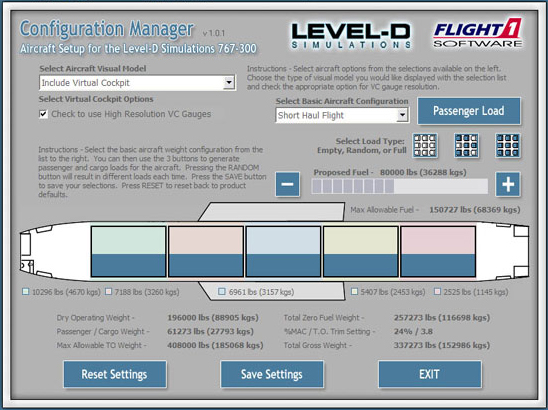
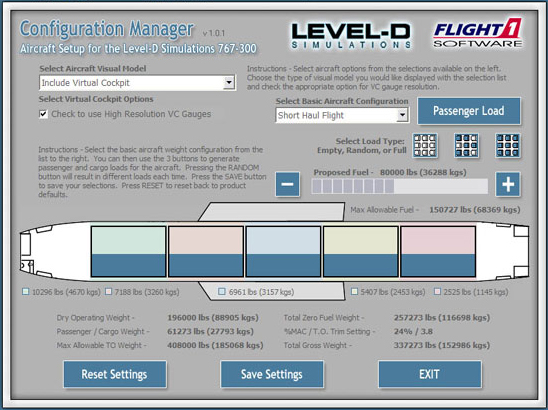
The LD767 comes with two additional utilities, the Repaint Manager and the Configuration Manager. The Repaint Manager is a nice utility that allows you to add or remove custom paint jobs (of which there are many high quality ones) while the Configuration Manager tailors the 767 to match your preferences. With the Configuration Manager you can change settings such as virtual cockpit preferences, cargo load, seating configuration, and fuel load. For my flight I arbitrarily picked “short haul” settings and 61-thousand pounds of cargo (in reality passengers and cargo, but I’m simulating a cargo operator). After configuring the aircraft, simply save the settings and the 767 will be configured accordingly when you enter the sim.
Related Posts:
Related posts:
 Boeing vs. Airbus – Part 2 Level-D Simulations Boeing 767 Page 2
Boeing vs. Airbus – Part 2 Level-D Simulations Boeing 767 Page 3
Boeing vs. Airbus – Part 2 Level-D Simulations Boeing 767 Page 4
Boeing vs. Airbus – Part 2 Level-D Simulations Boeing 767 Page 5
Boeing vs. Airbus – Part 2 Level-D Simulations Boeing 767 Page 6
Boeing vs. Airbus – Part 2 Level-D Simulations Boeing 767 Page 7
Boeing vs. Airbus – Part 2 Level-D Simulations Boeing 767 Page 8
Boeing vs. Airbus – Part 2 Level-D Simulations Boeing 767 Page 2
Boeing vs. Airbus – Part 2 Level-D Simulations Boeing 767 Page 3
Boeing vs. Airbus – Part 2 Level-D Simulations Boeing 767 Page 4
Boeing vs. Airbus – Part 2 Level-D Simulations Boeing 767 Page 5
Boeing vs. Airbus – Part 2 Level-D Simulations Boeing 767 Page 6
Boeing vs. Airbus – Part 2 Level-D Simulations Boeing 767 Page 7
Boeing vs. Airbus – Part 2 Level-D Simulations Boeing 767 Page 8
 Boeing vs. Airbus – Part 4 DreamFleet Boeing 727 WhisperJet


